
There are 2 different methods you can use for workshop maps in CS2. One is by loading a single map or creating a collection.
How To Get Your Workshop ID
You will need to know how to get a Workshop ID for both single maps and collections. Let's use this map for example: https://steamcommunity.com/sharedfiles/filedetails/?id=3070288532&searchtext=bhop
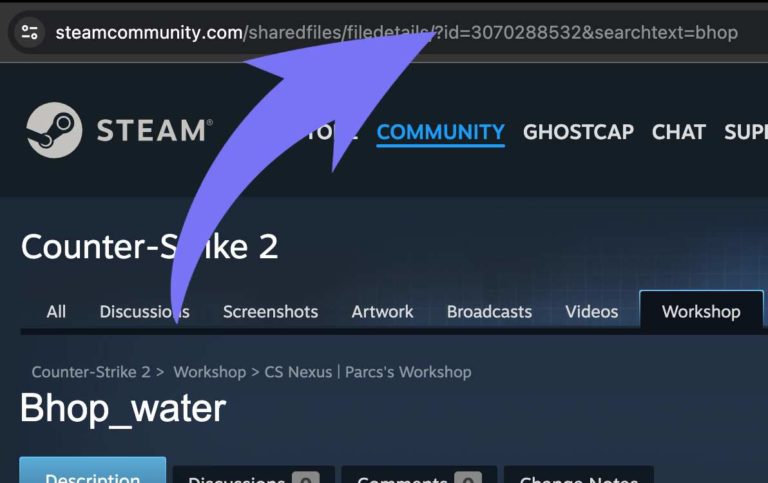
As you can see from the numbers in the URL, our map ID is 3070288532
How To Create And Load Workshop Collection
If you want to have multiple maps, then you will need to create a collection. A workshop collection is simply a group of workshop items. You will also need to modify the startup command for your server.
Note
Your collection must be active, approved and set public to work on a server. Collections are also limited to 100 maps. If you have more than 100 maps your entire collection will fail to load.
Here is what you need:
- Workshop Collection ID with maps you want to use
- An active GSLT (Game Server Token)
Let's first create the collection.
- 1Go to the CS2 Collections page here.
- 2Click
Create Collectionand add the maps you want to that collection. - 3Get the Collection ID from the URL (using the same method as getting the map ID)
- 4Go to your server Bropanel and select
Advanced → Startup Parameter - 5Make sure
Workshop Typeis set toWorkshop Collection
- 6Select
Workshop ID, and put your Collection ID in there and restart your server.
After that, simply restart the server and all the maps will be available. Type ds_workshop_listmaps in your console to check. You also don't need to edit any mapgroup or mapcycle files as CS2 will automatically create one for you.
Caution
The first time you restart the server with a new collection, it will need to download all the maps, so just leave it without restarting the server and let it finish downloading the files.
How To Load A Single Map
If you want to play a single workshop map with friends, you only need to know the single Workshop Map ID. Using the Workshop ID from our example above, go to your server and type this into the console: host_workshop_map 3070288532. It will then load the map you want.
If you always want to load this map, then follow these steps.
- 1Go to your server in Bropanel and select
Settings. - 2Make sure
Workshop Typeis set toSingle Workshop Map. - 3Select Workshop ID, and put your map ID in there and restart the server.
How To Update Workshop Maps
- 1Go to your server in Bropanel.
- 2Click
Restart
CS2 Workshop Commands
Here are the most common commands you can use.
| Command | Description |
|---|---|
| ds_workshop_changelevel | Changelevel to an available workshop map by name |
| ds_workshop_listmaps | List all available workshop maps from your collection |